TripShot
- 4.6
- Rating
- 100.00K
- Installs
- Free
- Price

 Analysis by App-foxy
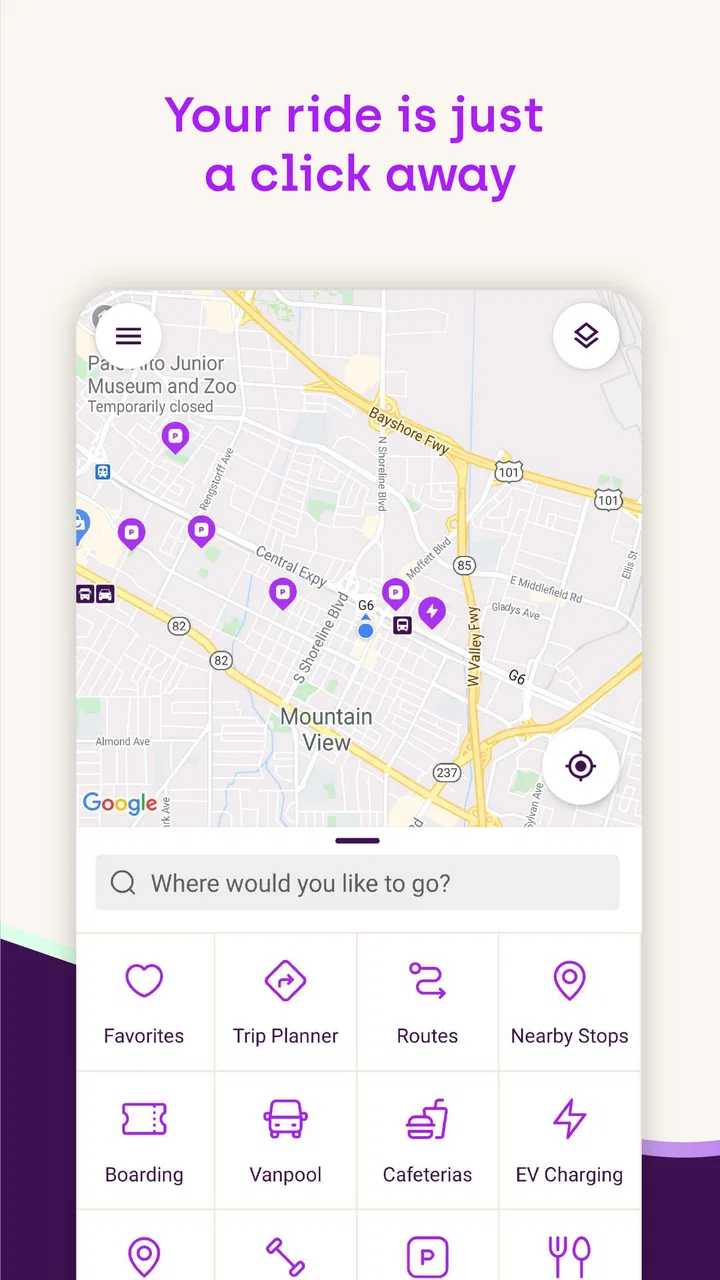
TripShot is the kind of transportation app I would judge less by how impressive its store page sounds and more by what happens when I am standing outside, checking a route, and trying not to miss the vehicle I need. Developed by TripShot, it belongs to the maps and navigation category and is available free for everyone. My overall impression is that it makes the most sense as a focused mobility tool for people whose transport provider uses the TripShot system, rather than as a universal replacement for every map app.
The app has been around since June 21, 2015, and its current version is 126. It supports devices running Android 8.0 or later. That gives it a fairly broad reach on Android, although the experience will still depend heavily on the transport network connected to it and on the quality of your phone’s connection at the moment you need information.
How TripShot feels when the network matters
The first thing I noticed about this type of app is that connectivity is not a minor convenience. A normal map application can often help me understand a city even when I am only browsing. TripShot is more time-sensitive. When I open it before leaving, I am usually looking for current transportation information, not simply a static street map. That means a weak mobile signal, congested public Wi-Fi, or a delayed connection can make the experience feel much more fragile than planning a route at home.
You May Also Like

 Blood Strike: 2.5 Anniversary
Blood Strike’s Loadouts Turn Every Drop Into a Tactical Gamble
A close look at Blood Strike’s custom loadouts: how fast access to signature weapons reshapes its battle royale rhythm, rewards preparation, and narrows the gap between fights.

 Pandora - Music & Podcasts
Pandora’s Music Is Easy to Start, but Harder to Recover
Pandora’s strength is its low-effort path from a seed to a station. Its weak spot is how much confidence it asks you to place in connection, setup, and quiet recovery.

 8 Ball Pool
 Is Built on Rivalries, Rematches, and Routine
A close look at the rivalries, rematches, shared routines, and unanswered safety questions that turn a quick pool match into a persistent mobile community.

 Samsung Music
’s Quiet Strength Is Playing What You Already Own
Its reach comes less from spectacle than from dependable access to a personal library. That simplicity is both the app’s strongest retention engine and its ceiling.

 AccuWeather: Weather Radar
AccuWeather Review: A Quick, Clear Forecast for Everyday Decisions
For everyday plans, the best forecast is the one you can understand quickly. AccuWeather makes rain timing, radar, and local conditions easy to act on, with a few trade-offs.

 Hill Climb Racing
Why Hill Climb Racing Still Turns Crashes Into One More Run
A tiny car, a bumpy hill and one more upgrade: Hill Climb Racing keeps resurfacing because its simple chaos makes every near-miss feel personal.
More From Our News Desk



In a good connection, the workflow is straightforward: I check the available transportation information, compare it with my intended trip, and use the result to decide when to leave. The value is greatest when I am already familiar with the destination but need help coordinating the journey. For example, I might know the building I am visiting but not the best way to reach it through a local shuttle or managed mobility service. In that situation, the app can be more relevant than a broad consumer map because it is designed around the transportation operation behind the journey.
That distinction is important. If I am exploring an unfamiliar city and want restaurant recommendations, walking directions, cycling layers, or a broad directory of every possible transport option, I would normally start with a general maps app. TripShot feels more useful when the question is narrower: how do I use the transportation service available to me, and what should I expect during this particular trip?
The practical rule is simple: open it before the last minute. I prefer to check my journey while I still have time to react. If the connection is slow, I can move somewhere with better reception, switch from unreliable public Wi-Fi to mobile data, or reconsider my departure time. Waiting until I am already at the pickup point removes that safety margin.
A realistic everyday journey
Imagine leaving work for an appointment across town. I know the address, but the local mobility service has several possible pickup points, and I do not want to guess which one fits the trip. I would check TripShot while still inside the building, confirm the available journey information, and then walk toward the appropriate departure area. If the app responds quickly, it reduces the uncertainty that usually comes from standing at a curb and watching several vehicles pass.
The useful part of this scenario is not that the app magically solves transportation. It gives me a place to organize the information supplied by the participating service. I still need to pay attention to the physical environment, follow local instructions, and allow time for walking. A digital route can point me toward the right general decision without removing the ordinary realities of traffic, crowded stops, or a confusing campus.
Connectivity also changes how much confidence I place in what I see. A screen that loads slowly or fails to refresh makes me less willing to treat the displayed information as current. I would rather make an early check and keep the basic trip details in mind than depend on repeatedly refreshing the app while rushing.
Where mobile use is strongest
TripShot is best suited to the moments when I am moving between places and need transportation information in context. A phone is more convenient than a desktop for checking a journey while walking to a stop, leaving a building, or deciding whether I should wait or take another option. The compact format also encourages quick checks instead of lengthy planning sessions.
That convenience comes with a trade-off. A small screen is not ideal for studying a complicated route or comparing many alternatives at once. For a multi-stop trip, I would rather plan the broad outline with a familiar map tool and use TripShot for the service-specific part. This division of labor keeps the app from being asked to do something it is not necessarily meant to replace.
I also find it helpful to think about the app in relation to the physical setting. On a large campus, business district, residential community, or other managed transportation area, the hardest part may not be finding the destination. It may be identifying the correct pickup location or understanding which service is relevant. A mobility-focused app can be more useful there than a general map that treats every road and stop equally.
For accessibility and comfort, the phone should be ready before the journey begins. I would avoid opening the app for the first time while carrying bags, crossing a busy area, or standing in poor weather. A few seconds spent checking the route indoors can make the mobile experience much less stressful. This is not a special feature; it is a sensible way to work around the limits of any connected navigation service.
What happens when the connection fails
The most important limitation is that a connected mobility experience can become uncertain when the network is uncertain. I do not treat a loading problem as proof that transportation itself is unavailable. It may simply mean the phone cannot retrieve the information at that moment. That distinction matters, because the wrong reaction is to keep tapping repeatedly while losing time.
My recovery routine would be deliberately simple. First, I would check whether the phone is connected to the intended network. If public Wi-Fi is slow, mobile data may be the better choice; if mobile reception is poor, I would move toward an open area or a building entrance. Then I would close and reopen the app only if the screen appears stuck, rather than continuously refreshing it. If the journey is urgent, I would use the transport provider’s ordinary backup instructions or ask staff nearby instead of relying on one screen.
Before leaving, I would also note the essential parts of the plan: the destination, the approximate departure context, and the pickup area. I am not claiming that the app provides an offline mode, because that is not something I would assume. The point is to avoid making the phone’s live connection the only thing I remember about the journey.
This is where TripShot differs from a printed timetable or a familiar route memorized over time. A traditional reference can be dependable for a fixed schedule, but it may not reflect the current service context. A connected app can be more convenient and timely when it works, yet it introduces a dependency that must be managed. I see that as a genuine trade-off rather than a flaw unique to this product.
There is another kind of failure worth considering: information can be technically available but difficult to interpret in a hurry. If I am unfamiliar with the local transport layout, I may still need to match the app’s terminology with signs, buildings, or pickup points in the real world. I would leave extra walking time on a first visit and avoid assuming that the closest-looking curb is automatically the correct place.
Using it without wasting mobile data
For ordinary route checks, I would not expect the app to be a major data burden, but careful habits are still worthwhile when a mobile plan is limited. The main mistake is repeatedly reopening or refreshing the journey while waiting. I would check once before leaving, check again when there is a meaningful change in my situation, and avoid keeping the screen active simply because I am anxious about the trip.
Wi-Fi can help when planning indoors, but I would not stay connected to an unreliable network just because it is free. A stalled request is more frustrating than a brief switch to a dependable connection. If I am on a metered plan, I would make the initial check where trusted Wi-Fi is available, then use mobile data for a short confirmation when I am ready to move.
Battery use is part of the same calculation. Navigation-related apps are most valuable when the phone is available at the moment of need, so I would avoid leaving the display on continuously during a long wait. I would also keep a simple mental note of the next step instead of treating TripShot as a live dashboard that must remain open from departure to arrival.
These habits are especially useful for people who commute regularly. After learning the usual pickup area and journey pattern, I can use the app for targeted checks rather than browsing aimlessly. That makes the experience faster, reduces unnecessary refreshes, and leaves me better prepared if reception becomes unreliable later.
Who will get the most from it
I would recommend TripShot to someone who regularly uses a transportation service organized through its platform, especially if that person wants service-specific information on a phone. It may also suit employees, residents, students, visitors, or commuters who find ordinary maps too broad for the local mobility system they actually use.
The app is less compelling for someone who only needs occasional walking directions or a general overview of public transportation in an unfamiliar city. In that case, a well-established maps application may offer a wider range of destinations and transport modes in one place. I would also hesitate to make TripShot my only planning tool for a complicated journey involving several unrelated operators. Its usefulness depends on how closely the available service matches the trip I need to make.
Another point is that free does not mean universally useful. There is no purchase price to create a barrier, and the Everyone content rating makes it approachable for a broad audience, but the real question is whether the relevant transportation network is available in the places I travel. A free app that does not cover my routine is less valuable than a paid or familiar alternative that consistently answers my actual navigation questions.
How it compares with familiar map alternatives
General map apps are usually better at broad discovery. They help me search for businesses, inspect streets, compare walking routes, and combine different types of directions. Their strength is breadth. TripShot’s appeal is more specialized: it is centered on mobility operations and the practical use of a participating transportation service.
I would therefore use the two categories together rather than force one to replace the other. A general map can help me understand the surrounding neighborhood and estimate the walk to a destination. TripShot can handle the service-specific part when that service is the important link in the journey. This approach is particularly sensible when the transport option is not obvious from a normal street map.
Compared with a static timetable, TripShot offers a more convenient mobile workflow, but it asks me to pay more attention to connectivity. Compared with a ride-hailing app, it may be a better fit for organized or shared mobility rather than a one-off private ride. Compared with a dedicated transit planner, its advantage is not necessarily universal coverage; it is the relationship between the app and the local transportation operation.
That specialization is both its identity and its boundary. I would not install it expecting a complete replacement for every navigation tool on my phone. I would install it when the transportation service I use points me toward it and when having that service in a mobile format would make my routine easier.
My final connectivity verdict
TripShot earns a favorable impression from me as a focused maps and navigation app, but I would judge it by the quality and relevance of the connected mobility service around it. Its strongest moments come before and during a real journey: checking the available transportation information, preparing for the pickup point, and making a quick decision while away from a desk.
The app has a 4.7 average from around a thousand ratings, with more than a hundred written reviews, and it has passed the hundred-thousand-install mark. Those figures suggest that it has found a real audience, but they do not change my main advice: confirm that it fits your local transport routine before treating it as essential.
My recommendation is to use it proactively. Check the journey while you have a reliable connection, learn the physical pickup area, limit unnecessary refreshes, and keep a basic backup plan for moments when reception fails. If your daily transportation is connected to TripShot, those habits can make the app feel genuinely useful. If you want a universal city map with rich place discovery and every transport option in one view, I would choose a broader alternative instead.
For the right user, the free price and broad Everyone rating make trying it easy. For me, the decisive question is not whether it can replace every navigation app, but whether it makes my particular mobility service easier to understand when I am actually on the move. In that narrower role, it is a practical companion, provided I respect its dependence on a working connection.
FAQs for TripShot
01What is TripShot and how does it work?
TripShot is a comprehensive transportation management app that offers real-time tracking, scheduling, and routing solutions. It is designed to streamline commuting, whether for public transit, corporate shuttles, or school buses. Users can view live maps, receive notifications about schedule changes, and access trip planning features, making it an essential tool for efficient travel.
02Is TripShot available for both Android and iOS devices?
Yes, TripShot is available for both Android and iOS devices. You can download the app from the Google Play Store for Android devices and the Apple App Store for iOS devices. Ensure your device meets the minimum system requirements to enjoy a seamless experience with all the app’s features.
03Does TripShot offer real-time updates and notifications?
TripShot provides real-time updates and notifications, allowing users to stay informed about their transportation schedules. The app sends alerts about delays, route changes, and estimated arrival times, ensuring that users can plan their journeys effectively and make adjustments as needed for a smoother travel experience.
04Can TripShot be used for different types of transportation services?
Yes, TripShot is designed to accommodate various transportation services, including public transit, corporate shuttles, school buses, and more. Its versatile platform allows organizations to manage their specific transportation needs efficiently, providing users with a unified interface to track and plan their trips across different services.
05Are there any costs associated with using TripShot?
The cost of using TripShot can vary depending on the organization or service provider. While the app itself is free to download, some features may require a subscription or be available only through participating transportation services that have partnered with TripShot. It's best to check with your specific provider for detailed pricing information.
Pros
- User-friendly interface for easy navigation.
- Real-time tracking for accurate updates.
- Comprehensive route planning features.
- Offline access to saved schedules.
- Customizable notifications for alerts.
Cons
- Limited integration with other transit apps.
- Occasional GPS inaccuracies reported.
- Requires stable internet for full features.
- Battery consumption can be high in use.
- Not available in all regions globally.

TripShot
Gallery